Gift Icon: A Versatile 3D Design for Digital Projects
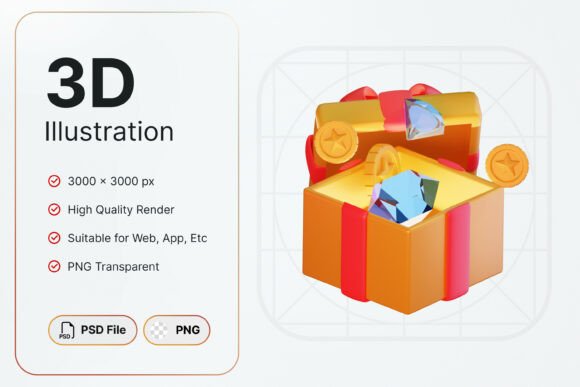
For creators, marketers, and developers looking to enhance their digital content, the Gift Icon is a standout choice. This charming 3D gift icon features bright colors and intricate details that can elevate any project. Whether you're working on a holiday campaign, a gaming interface, or a loyalty program, this icon offers a visually appealing solution that's both functional and attractive.
Why Choose a Gift Icon?
The Gift Icon is more than just a visual element—it’s a tool that can convey a sense of reward, celebration, or achievement. Its vibrant design makes it ideal for promotions, bonuses, and special events. The high-resolution 3000x3000px format ensures clarity and sharpness across various platforms, from mobile apps to web interfaces. With a transparent background, it seamlessly integrates into different designs without disrupting the overall aesthetic.
Whether you're designing a mobile app, creating marketing materials, or developing a game, the Gift Icon provides a consistent and professional look. Its adaptability makes it a valuable asset for a wide range of projects, especially those with a festive or celebratory theme.
Common Mistakes When Using Gift Icons
Despite its appeal, some users may overlook important details when selecting or applying a Gift Icon. One common mistake is not checking the file format and resolution. While the Gift Icon comes in PNG and PSD formats, ensuring these files meet your project’s requirements is essential. For example, if you’re designing for print, a higher resolution might be necessary, though the 3000x3000px size should suffice for most digital uses.
Another frequent error is failing to consider the icon’s transparency. If the background isn’t properly handled, the icon might clash with the design it’s placed on. Always test the Gift Icon in your intended environment to ensure it blends well and maintains its visual impact.
What You Get with the Gift Icon
The Gift Icon includes two key files: a PNG and a PSD. The PNG file is perfect for quick integration into websites, apps, or social media posts. The PSD file, on the other hand, allows for more advanced editing, giving designers greater flexibility to customize the icon’s placement and effects. However, it’s important to note that the assets cannot be altered in color or shape, so any modifications must be done within the provided layers and structure.
This limitation means that users should carefully review the icon before use to ensure it matches their design needs. If a different color scheme or shape is required, alternative assets may need to be sourced, as the current version does not support customization.
Practical Tips for Using the Gift Icon
To make the most of the Gift Icon, start by evaluating your project’s specific requirements. Ask yourself: What is the purpose of the icon? Where will it be used? What style or theme does the design follow? These questions can help determine whether the Gift Icon is the right fit.
When downloading or purchasing the Gift Icon, always verify the source. Ensure that the files are authentic and come from a reliable provider. Some free icons may lack the quality or resolution needed for professional use, while others may include hidden costs or restrictions.
Once you have the files, test them in different contexts. For instance, if you’re using the icon in a mobile app, check how it looks on various screen sizes and resolutions. If it’s part of a promotional campaign, ensure it stands out against the background and complements the overall message.
Realistic Examples and Better Approaches
Consider a scenario where a small business owner wants to create a loyalty program. They might choose the Gift Icon to represent rewards or achievements. However, if they don’t test the icon on their website or app, they could end up with a design that doesn’t align with their brand or looks unprofessional. A better approach would be to preview the icon in the actual environment and adjust other design elements as needed.
Another example involves a game developer looking to add a celebration element to their game. The Gift Icon could serve as a visual cue for completing a level or unlocking a bonus. However, if the icon is too small or not clearly visible, players might miss the reward. A more effective strategy would be to scale the icon appropriately and place it in a prominent location within the game interface.
What to Check Before Using the Gift Icon
Before finalizing the use of the Gift Icon, review the following checklist:
- File Format: Confirm that the PNG and PSD files meet your project’s technical requirements.
- Resolution: Ensure the 3000x3000px size is suitable for your intended use, whether digital or print.
- Transparency: Verify that the background is correctly transparent and compatible with your design.
- Customization: Understand the limitations of the assets—no changes to color or shape are allowed.
- Source: Purchase or download from a trusted provider to avoid issues with quality or legality.
Conclusion: Make Informed Choices with the Gift Icon
The Gift Icon is a powerful tool for enhancing digital projects with its vibrant design and high-quality resolution. However, its effectiveness depends on how it’s chosen, applied, and integrated into your work. By avoiding common mistakes, checking key details, and testing the icon in real-world scenarios, you can ensure it delivers the desired impact.
Whether you’re a designer, marketer, or developer, the Gift Icon offers a practical and visually appealing solution. With careful consideration and proper implementation, it can become a valuable asset in your creative toolkit. Always take the time to evaluate your options and make decisions that align with your goals and standards.