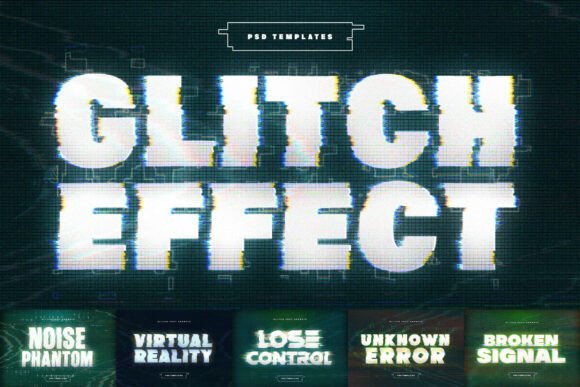
Digital Glitch Text Effect
When you think of digital imperfection, you might imagine a broken screen or a corrupted file. But in the world of design, those very flaws can become powerful tools. The Digital Glitch Text Effect is more than just a visual trick—it's a way to inject raw energy into your work. This effect mimics the chaotic beauty of signal interference, pixel displacement, and RGB splitting, creating a look that feels both futuristic and deeply human.
Unlike simple filters, the Digital Glitch Text Effect is built with precision. It’s not about random noise; it’s about controlled chaos. Every distortion, every color shift, is intentional. Whether you're working on a cyberpunk-themed project or trying to capture the essence of a malfunctioning system, this tool gives you the power to create something that feels alive.
Real-World Applications of the Glitch Text Effect
Designers across industries are finding new ways to use glitch effects. In cyberpunk sci-fi branding, for example, the Digital Glitch Text Effect can help you craft logos that feel like they belong in a high-tech dystopia. Imagine a tech startup logo that pulses with digital noise—something that screams innovation while still feeling grounded in the real world.
For music event promotion, glitch text can add a sense of urgency and intensity. Techno and industrial posters often rely on high-energy visuals, and the Digital Glitch Text Effect offers a way to make your designs stand out. Think of a concert flyer where the title seems to be breaking apart, as if the screen itself is struggling to keep up with the beat.
Urban streetwear brands also benefit from this effect. Glitch graphics on t-shirts, stickers, and merchandise can give a brand a gritty, rebellious edge. It’s a way to visually communicate that the brand isn’t afraid to break the rules—literally.
Why It Matters for Content Creators
You don’t have to be a professional designer to appreciate the value of the Digital Glitch Text Effect. For YouTube creators and social media managers, it’s a way to make thumbnails and headers more eye-catching. A video thumbnail that looks like it’s been corrupted by a virus can grab attention in a crowded feed. It’s not just about looking good—it’s about standing out.
Cinematic titles are another area where this effect shines. Horror films, in particular, can use glitch text to build tension. A title that flickers, distorts, or breaks apart can set the tone before the first scene even plays. It’s a subtle but effective way to immerse your audience in the story.
How Different Users Can Benefit
The Digital Glitch Text Effect isn’t one-size-fits-all. What works for a gaming channel might not work for a corporate website. The key is understanding how to apply it without losing clarity. For instance, a glitched logo for a gaming channel could be bold and chaotic, while a glitched header for a blog might need to be more subtle.
Consider the audience you’re targeting. If you’re designing for a younger demographic, a more aggressive glitch effect might resonate. If you’re going for a more sophisticated look, you might dial back the intensity. The Digital Glitch Text Effect allows for customization, so you can tailor the look to fit your specific needs.
Practical Examples and Observations
Take a look at some of the most iconic glitch designs. They often use a mix of color shifts, pixelation, and scanline interference. These elements work together to create a sense of movement and instability. A well-executed glitch effect can make text feel like it’s alive, pulsing with energy.
One common mistake is overusing the effect. Too much distortion can make text hard to read. The Digital Glitch Text Effect is designed to maintain legibility, but it’s still important to strike a balance. Test different levels of intensity to see what works best for your project.
Another consideration is resolution. The Digital Glitch Text Effect is built at 4500 x 3000 px, ensuring that even the smallest details remain sharp. This makes it ideal for high-resolution displays and large-format prints. Whether you’re designing for a billboard or a mobile screen, the effect holds up under scrutiny.
What to Consider Before Using It
Before applying the Digital Glitch Text Effect, think about the message you want to convey. Is the goal to shock, to inspire, or to inform? The effect can be used in many ways, but it’s important to align it with your overall vision. A glitched headline for a tech conference might be appropriate, but the same effect on a financial report could be distracting.
Also, consider the platform where the design will be used. Some platforms may not support high-resolution files, so you might need to adjust the size or format. Always test your work in different environments to ensure it looks its best everywhere.
Finally, remember that the Digital Glitch Text Effect is a tool, not a solution. It can enhance your work, but it won’t fix poor design choices. Use it wisely, and let it complement your creative vision rather than overshadow it.