Cyberpunk RGB Analog Photoshop Action
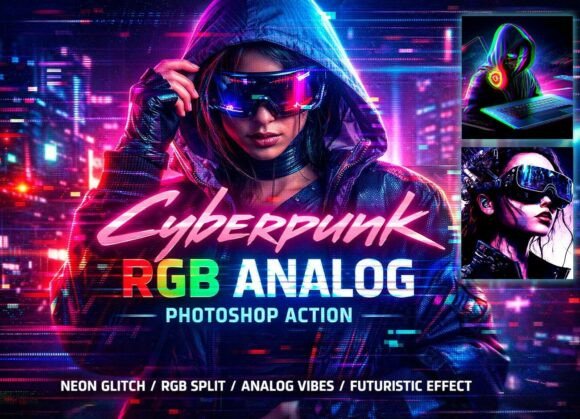
The Cyberpunk RGB Analog Photoshop Action is a powerful tool that transforms ordinary photos into striking cyberpunk visuals with just one click. Designed for photographers, designers, and digital artists, this action combines neon colors, RGB splits, analog distortion, glitch effects, and retro noise to create a futuristic cinematic look. Whether you're working on a personal project or a professional assignment, this action offers a quick and effective way to elevate your images without advanced Photoshop skills.
What Makes This Action Unique
This Photoshop action stands out by blending multiple visual elements into a cohesive cyberpunk aesthetic. The RGB Analog Split Effect adds a dynamic layer of color and movement, while the Neon Cyberpunk Color Grading ensures your images pop with vibrant, high-contrast tones. Analog Distortion and Glitch Effects bring a sense of unpredictability and raw energy, perfect for creating a modern, edgy feel. These features are combined in a way that’s both visually compelling and technically sound.
Why Different Audiences Care
For beginners, the Cyberpunk RGB Analog Photoshop Action offers an accessible entry point into digital design. It simplifies complex editing tasks, allowing users to experiment with cyberpunk styles without needing to master every Photoshop feature. For professionals, it serves as a time-saving tool that maintains quality and consistency across projects. Photographers may use it to enhance portraits or street shots, while content creators can apply it to thumbnails, social media posts, or album covers to stand out in a crowded space.
How Different Users Might Use It
Photographers focusing on fashion or night scenes might appreciate the ability to add a dramatic, neon-lit atmosphere to their work. Game developers or video editors could use it to create eye-catching thumbnails or promotional materials. Educators teaching digital art might find it useful as a demonstration tool, showing students how to achieve specific effects efficiently. Business owners looking to market their brand online could use it to create a unique visual identity that aligns with modern trends.
Key Features and Benefits
The Cyberpunk RGB Analog Photoshop Action includes several features that make it versatile and user-friendly. One Click Cyberpunk Effect ensures instant results, while Non-Destructive Layers allow for easy adjustments without altering the original image. Fully Editable Effects give users control over the final outcome, and Organized Layers Groups help maintain a clean workflow. The action is compatible with various Photoshop versions, making it accessible to a wide range of users.
Practical Examples for Different Users
A YouTuber looking to improve their channel’s branding might use the action to create a consistent visual style for thumbnails and cover images. A graphic designer working on a sci-fi poster could apply the effect to add depth and realism. An Instagram influencer might use it to enhance their feed with a cohesive cyberpunk theme. Each of these scenarios highlights how the action can be adapted to meet different creative goals.
Considerations for Different Skill Levels
Beginners will likely value the ease of use and the ability to produce professional-looking results quickly. They may focus on learning how to apply the action and experimenting with its settings. Experienced users, on the other hand, might prioritize customization options and the ability to integrate the action into their existing workflows. Both groups can benefit from the action’s flexibility and reliability.
Factors That Influence Decision-Making
When evaluating whether the Cyberpunk RGB Analog Photoshop Action suits their needs, users should consider factors like ease of use, cost, quality, and long-term usefulness. For instance, a small business owner might weigh the cost against the potential increase in engagement or brand recognition. A hobbyist might focus on creativity and learning value, while a professional might prioritize speed and efficiency.
Installation and Usage Tips
Installing the Cyberpunk RGB Analog Photoshop Action is straightforward. Once downloaded, users can simply load the ATN file into Photoshop and apply it to their images. The included help file and video guide provide additional support, ensuring even first-time users can get started with confidence. Customization options allow users to fine-tune the effects to match their specific vision.
Getting the Most Out of the Action
To maximize the benefits of the Cyberpunk RGB Analog Photoshop Action, users should experiment with different settings and combine the effect with other tools. For example, adding a subtle gradient overlay or adjusting the contrast can further enhance the final result. Testing the action on a variety of images helps users understand its versatility and limitations.
Conclusion
The Cyberpunk RGB Analog Photoshop Action is a valuable resource for anyone looking to create high-impact cyberpunk visuals. Whether you’re a beginner exploring digital design or a professional seeking efficient tools, this action offers a practical solution that balances creativity with usability. By understanding how it can fit into different workflows and goals, users can make informed decisions about whether it meets their specific needs. With its combination of features and accessibility, it’s a tool worth considering for a wide range of applications.